Windows OS에서 지난번indows OS에서 지난번 설치한 "Git"을 통해 저장소 생성 → 파일 생성 → add → Commit 을
진행해보자
- 참고링크
[Git & GitHub] Windows OS Git Install #2
[Git & GitHub] Windows OS Git Install #2
"Git" 을 Windows 11 OS 에서 설치 해보자!!!- 참고링크[Git & GitHub] Git, GitHub 란 ? #1 [Git & GitHub] Git, GitHub 란 ? #1"Git & GitHub" 개발을 시작하면 가장 많이 듣게되는 Git, GitHub 무엇일까?? 전세계 개발자들이 가
coxfactor-tech.tistory.com
폴더 생성 및 이동 → 프로젝트 폴더 생성 → git init (저장소 초기화) → 파일 생성
→ git add . (스테이징) → git commit (커밋) → git log (확인)
1. Git Bach 실행 > 작업 폴더 생성 > 작업 폴더 이동
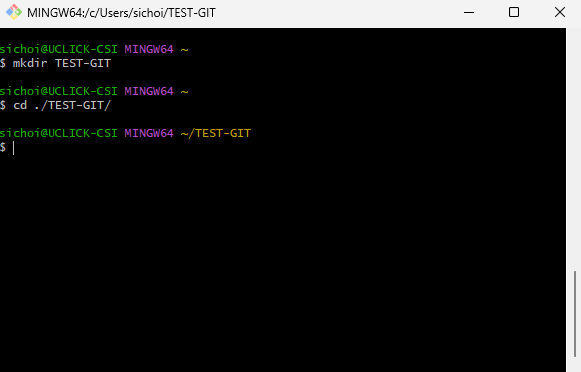
2. Git Repository(저장소) 생성

3. 계정 정보 설정

4. 파일 생성

5. Staging 및 상태확인

6. Commit & Log 확인
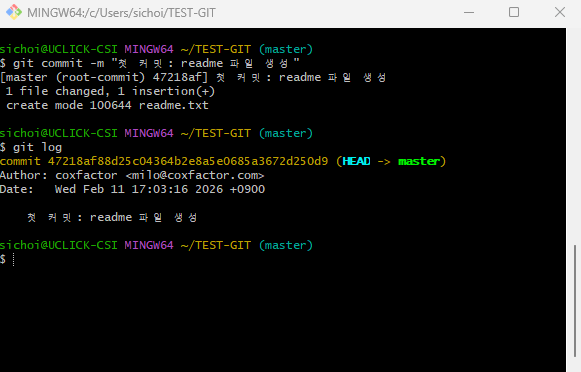
# 1. 폴더 이동
pwd
mkdir /c/Users/coxfactor/workspace
cd /c/Users/coxfactor/workspace

# 2. 프로젝트 생성
mkdir myproject
cd myproject

# 3. Git 저장소 생성
git init

# 4. 계정 정보 설정 (글로벌)
git config --global user.name "coxfactor"
git config --global user.email "coxfactor@example.com"

# 5. 파일 생성
echo "Hello Git" > readme.txt
ls

# 6. 스테이징
git add .

# 7. 커밋
git commit -m "첫 커밋: readme 파일 생성"

# 8. 확인
git log
Next > ?
'Development Tools > Git & GitHub' 카테고리의 다른 글
| [Git & GitHub] GitHub Repository를 로컬 Git에 연결 #6 (0) | 2026.03.16 |
|---|---|
| [Git & GitHub] Github 시작하기 #5 (0) | 2026.02.25 |
| [Git & GitHub] Git 기초 필수 용어 정리 #3 (0) | 2026.02.10 |
| [Git & GitHub] Windows OS Git Install #2 (2) | 2026.01.15 |
| [Git & GitHub] Git, GitHub 란 ? #1 (0) | 2026.01.15 |